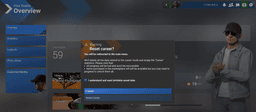
You just flew a perfect flight. Nailed the approach, greased the landing, followed every ATC instruction. Then the results screen pops up and you've scored 62%. Airline Procedures: 38%.
Thirty-eight percent. On a category you didn't even know existed.
This is the MSFS 2024 career mode scoring experience. The system is simultaneously the most important mechanic in career mode and the one Asobo has done the worst job explaining. Your score determines your reputation, your reputation determines your payouts, and somewhere between takeoff and landing the game is silently docking you points for things you can't see and sometimes can't control.
This guide tears the whole thing apart. Every scoring category, every penalty trigger, every known bug, and every workaround the community has found. If you haven't read the basics yet, start with the MSFS 2024 career mode guide — this one assumes you know how missions work.
How Scoring Categories Work
There's no single universal scoring formula. The game evaluates different things depending on what type of mission you're flying. Asobo has never published a scoring specification, so the breakdown below is how the results screen and community testing describe it. Here's what matters for each:
Cargo Missions
- Cargo Integrity — how gently you handle the aircraft. Hard turns, rough turbulence, and especially hard landings damage cargo.
- Airline Procedures — lights, speeds, ATC compliance, all the procedural stuff.
- Aircraft Condition — land the plane in the same condition you took off in.
Passenger and VIP Charters
- Passenger Comfort — smooth flying, gentle turns, minimal turbulence exposure.
- Airline Procedures — everything from taxi speed to cabin announcements.
- Landing Smoothness — passengers feel that touchdown. Keep it under 200 fpm if you can.
Passenger and charter missions include announcement steps — the release notes name ones such as announcing before you enter the runway, once you've cleared it, and when you taxi to parking. Miss them and Airline Procedures takes a hit.
Sightseeing
- Passenger Comfort — still matters, but the game is slightly more forgiving here since you're manoeuvring more.
- Viewing range and altitude — fly too high and passengers can't see anything. Fly too low and you're scaring them.
- Landing Smoothness — same as passenger flights.
Search and Rescue
SAR missions play completely differently. Speed matters — how quickly you find the target is a major scoring factor. But fly too erratically and players report the mission can fail outright. It's a balancing act between urgency and control.
Firefighting
- Execution time — faster is better.
- Fire extinguished percentage — partial credit for partial work, but you want 100%.
Medivac
Smoothness is everything. You're carrying injured people. Every bump, every hard bank, every rough approach costs you points.
What Every Mission Type Shares
Regardless of mission type, the game is always watching:
- Flight smoothness — erratic inputs, sudden corrections, and turbulence encounters
- Takeoff and landing efficiency — clean departures and stable approaches
- Safety — overspeed events, stall warnings, gear and flap limits
- ATC adherence — responding to calls, following assigned headings and altitudes
- Navigation accuracy — staying on your filed route
- Speed control — maintaining assigned speeds
- Taxi and ground operations — speed, staying on markings, correct light usage
The Airline Procedures Mystery
Airline Procedures is the category players understand least — the community's own career wiki calls it "only partially understood", alongside passenger satisfaction. What the release notes do show is that it is built from procedural steps: Sim Update 1 fixed an "Announce clear runway" step that had been stopping players reaching the maximum score on the Airline Procedures objective. So a single missed step can pull the category down on an otherwise clean flight, and because it feeds into your overall grade, one bad procedural flight can drag down an otherwise great run.
Every Penalty Trigger We Know About
This is the section you'll probably bookmark. These are the specific things the game penalises, gathered from community testing, forum bug reports, and patch notes.
Taxi Penalties
- Taxi speeding. The game scores taxi speed — Sim Update 2 even added a taxi-speeding aviator performance to certifications — but Asobo doesn't publish the threshold. Players report tickets from the high teens to the mid-20s of knots depending on the aircraft, and the community wiki's rule of thumb is about 22 kt. Keep it under 20 kt to be safe.
- Lights. Asobo doesn't document which light checks career mode runs. The one players have confirmed by name is "No landing light at night landing" (see below). The safe habit is real-world practice: beacon on before you start moving, strobes on as you enter the runway.
- Leaving taxiway markings. Stay on the yellow line. At small airports where taxiways barely exist, this gets absurd — but the game doesn't care.
In-Flight Penalties
- Busting 250 kt below FL100. Standard real-world rule. The game enforces it. Even in aircraft that can barely reach 250 kt, the system is watching.
- Exceeding max flap speed. Every aircraft has published flap speed limits. Exceed them and you'll get dinged for safety and aircraft condition.
- Not responding to ATC calls. When ATC talks to you, acknowledge. If the ATC button disappears (it's a known bug), you're going to eat a penalty you can't avoid.
- Entering restricted airspace — no longer. This one is gone. Sim Update 6 (August 2026) "[r]emoved 'prohibited airspace aviator performance penalty'" and removed the "out of boundaries and away from flightplan" failure along with it.
Landing Penalties
- Hard landings. Sim Update 2 added a hard-landing aviator performance to career activities. Asobo doesn't publish the threshold; under 200 fpm is a safe target, and the harder you land above that, the more you risk.
- Landing on the "wrong" runway. If ATC assigns you runway 27 and you land on 09 (same strip, opposite direction), that's a penalty. Even if the wind clearly favours the other end.
- Landing lights off. The penalty reads "No landing light at night landing". Keep your landing lights on for the approach and landing and you won't meet it — the section on known bugs below covers the cases where it fires unfairly.
Cabin and Procedures Penalties
- Missing cabin announcements. Passenger and charter missions have announcement steps — before entering the runway, after clearing it, taxiing to parking. Each missed one hurts your Airline Procedures score.
Get flight sim tips in your inbox
New guides, checklists, and tips. No spam. Unsubscribe any time.
Known Bugs That Will Cost You Points
Some penalties aren't your fault. They're bugs. And until Asobo fixes them, you need to know about them so you can work around them — or at least stop blaming yourself. One piece of good news first: since Sim Update 6, Career can recognise some failures caused by aircraft code, by a bad aircraft state after a Skip or Back-on-Track, or by airport surface issues, and when it does it no longer hands out penalties, score reductions or reputation loss for them.
The Landing Light Penalty
The "No landing light at night landing" penalty has caught players who had their lights on. The best-documented case is the PC-12, whose landing lights sit on the landing gear: once the gear is up the lights are hidden, and players reported the penalty firing in cruise and descent from January to August 2025. You'll also see a theory repeated that the game judges day and night by UTC rather than local time; nobody has confirmed it. Keep your landing lights on for every approach and landing and you'll dodge the common cases.
Flap Penalties on the Ground
At launch, the flap speed limits in several aircraft — the G36 Bonanza, the DHC-2 Beaver and the VL3 among them — were set so low that extending flaps triggered an overspeed penalty even with the aircraft parked. That forum report is marked fixed. Sim Update 5 also fixed a run of flap overspeed penalties that fired after using Skip in airliners. If you still see a flap penalty with the aircraft stopped, it's a bug worth reporting.
Wrong Runway Detection
Sometimes you simply cannot change to the correct runway without taking a penalty. ATC assigns a runway, the wind says otherwise, and switching gets you dinged. There's no clean solution — this one just costs you points occasionally.
ATC Buttons Disappearing
Mid-mission, the ATC response buttons sometimes vanish. You can hear ATC talking to you but can't respond. The game then penalises you for not responding. Restarting the ATC menu sometimes helps, but often doesn't.
Taxiway Penalty on Landing Rollout
Introduced around SU2, this bug penalises you for "entering the taxiway" while you're still on your landing rollout. You haven't left the runway — you're decelerating in a straight line — but the game thinks you've wandered onto a taxiway. Particularly common at airports where the runway and taxiway are close together. Sim Update 6's airport-surface detection is meant to catch cases like this.
Grass Airstrips With No Markings
Some bush strips have no taxiway markings at all. Players report the game still expecting them to follow non-existent lines and penalising them for "leaving the taxiway." There's no workaround except accepting the penalty or avoiding these airports.
Restricted Airspace Routing
The game's flight planner sometimes routed you directly through restricted airspace, and you'd be penalised for following it. Sim Update 6 fixed this the blunt way: the prohibited airspace penalty no longer exists.
Catastrophic Reputation Drops
Multiple players have reported their reputation dropping from S to C in a single flight with no obvious pilot error. The cause isn't fully understood, but it may be related to stacking multiple small penalties that individually seem minor but collectively destroy your score. The Career Mode Service Patch 2 protective floor (see below) helps limit this, but it still happens.
The Reputation System
Your reputation is the single most important number in career mode, because it directly affects your income. Understanding how it works — and how to protect it — is essential. For the full financial picture, check the career mode money guide.
The Scale
Reputation runs from D (lowest) to S (highest): D, C, B, A, S.
How It Moves
Your reputation is a weighted moving average, not a simple average. High-XP missions shift your reputation more than low-XP ones. This means one bad performance on a long, high-value flight hurts more than five mediocre performances on short hops.
This also means you can't just grind easy missions to climb. You need to perform well on the missions that matter — the long, complex, high-paying ones.
Why It Matters: Tier Benefits
- S-tier: 25% insurance discount + the biggest reputation bonus on payouts
- A-tier: 20% insurance discount + a smaller reputation bonus
- B-tier and below: Progressively smaller bonuses, no discount
Community measurements put the reputation bonus at around 20% of the payout at S-tier and 10% at A-tier. On a single flight that's a noticeable margin rather than a fortune — but it applies to every mission, and alongside the insurance discount it compounds over a career.
The Protective Floor (Career Mode Service Patch 2)
Career Mode Service Patch 2 (December 2024) added an important safety net: if you have S-tier reputation and score an A on a flight, your reputation cannot drop below A. This prevents the catastrophic single-flight reputation crashes that plagued earlier versions. It's not perfect — you can still drop from S to A, which costs you that 5% insurance difference — but it stops the worst-case scenarios where one bugged flight destroys weeks of work.
How Payouts Actually Break Down
Understanding the payout formula helps you decide which missions to prioritise and which costs to worry about. Here's the real structure:
Payout Components
Every mission payout consists of up to four parts:
- Base Income — fixed amount determined by the mission itself (distance, cargo, complexity)
- Reputation Bonus — a percentage added based on your current reputation grade
- Skip Cost — a deduction, not a bonus. This changed in Sim Update 6 (August 2026): the release notes say Asobo "[r]eplaced 'No Skip Bonus' with 'Skip Cost' in mission reward screen and change how it is calculated". Both halves matter — the line is now money coming off rather than money awarded, and the arithmetic behind it is not the arithmetic any pre-SU6 guide or forum thread described. Asobo did not publish the new numbers, so the figure that counts is the one on your own reward screen. The money guide covers the strategy around it.
- Bad Weather Bonus — can be massive. Flying in poor conditions pays significantly more.
Why there is no worked example here any more
This section used to print a community payout breakdown, with a 41,750 "No-Skip Bonus" as its largest line. That screen does not exist any more. SU6 replaced the bonus with a Skip Cost, changed how it is calculated, and separately rewrote the presentation so that "[t]he presentation of mission payouts and bonuses before and after Career missions has been updated to make them clearer and easier to understand".
A breakdown captured before August 2026 is therefore a photograph of a different system, and re-pointing its percentages at the new one would be inventing data. What is still true is the shape: a base income set by the mission, bonuses added for reputation, performance and conditions — bad weather in particular pays well — and a Skip Cost taken off for phases you skipped. SU6 also added difficulty bonuses for night operations at unlit airfields.
The reward screen now itemises all of it. Fly one mission, read it, and use your own numbers rather than anyone's table.
Skip vs Sim Rate: The Most Important Choice You'll Make
Here's a tip that will immediately improve your career mode income, and most players don't discover it until they've already lost thousands of credits: never skip, always use sim rate.
Why Skipping Is Devastating
Skipping a phase of flight (climb, cruise, descent) takes a serious bite out of your payout. Under the pre-SU6 system players reported three-thousand-credit missions paying a few hundred after a skip — those reports describe the old arithmetic, and are here as history, not as a figure to plan against. The direction has not changed; the accounting has, and it is now visible on the reward screen as the Skip Cost line. Under the old system descent skips were the expensive ones, with taxi, takeoff and parking skips comparatively cheap.
But it gets worse. Skip-to-takeoff — the option that lets you bypass taxi and startup — can actually crash your aircraft. It spawns you on the runway and sometimes the physics engine disagrees with the spawn position. Destroyed wheels, collapsed gear, a six-figure repair bill. From a skip.
Sim Rate: The Free Alternative
Sim rate acceleration (2x, 4x, 8x) is not a skip, and it doesn't cost you the way one does. You get the same payout flying at 8x sim rate as you do at 1x. The only difference is the flight takes a fraction of the time.
Long boring cruise segment? Crank it to 8x. Tedious climb to FL350? 4x until you're close to your cruise altitude. You save the same amount of real-world time as skipping, and you pay no Skip Cost.
This single change — switching from skip to sim rate — is probably worth more credits per hour than any other optimisation in career mode. For more on maximising your earnings, see the career mode passive income guide.
The Workaround Checklist
These are the practical tactics experienced players use to avoid losing points to bugs and opaque scoring. Some are bug workarounds, some are just good practice. All of them will improve your scores.
Lights Protocol
- Landing lights: ON for every approach and landing. The penalty is "No landing light at night landing", and keeping them on sidesteps it — some players simply leave them on all flight to be safe. It's unrealistic at FL350, but the game only penalises you for having them off.
- Beacon lights: ON during taxi and flight. Turn them on before you start moving. Leave them on.
- Strobes: OFF until entering the runway. Activate them as you line up, not before.
Aircraft to Avoid
- ES-30, Saab 340 and King Air 350i — the community career wiki still lists these as aircraft to avoid for career work
The launch-era flaps-on-ground bug in the G36 Bonanza and others is marked fixed, so those are fine again. Whatever you're eyeing, test it in Employee Mode before you buy it. The best aircraft guide can help you find a replacement.
Pre-Flight Checks
- Check the fuel selector at the start, and after any skip. The release notes have logged skips that left the selector OFF and killed the engine. In the C172, set it to "Both".
- Bind "add fuel quantity" to a key. Some missions under-fuel you, and some aircraft (the PC-24 has been the usual suspect) burn more than they should. Having a quick way to add fuel prevents running dry mid-mission. Check the fuel before you commit to the flight.
In-Flight Tactics
- Climb extra thousands above terrain in GA aircraft. Low-level GA flying in mountainous terrain means turbulence, and turbulence means comfort penalties. Adding a few thousand feet of buffer smooths things out considerably.
- Cancel IFR only if ATC is giving truly bad vectors. Since Sim Update 6 there's no restricted airspace penalty left to dodge, so cancelling IFR mostly just costs you ATC adherence points. Save it for vectors that take you into terrain.
Ground Operations
- Use pushback on tight stands. Some gates and parking spots leave you facing a wall with no room to taxi forward. Request pushback from the ground services menu (or bind the pushback command) to get pointed the right direction.
- At small airports without taxiways, some players drive on the grass around the runway. It sounds absurd, but taxiing on the runway itself to reach the threshold can trigger penalties. Going around on the grass avoids the "wrong taxiway" detection.
The Universal Rule
When in doubt, fly conservatively. The scoring system rewards boring, procedurally correct flying over impressive piloting. A perfectly smooth 3-degree glideslope to a 150 fpm touchdown will always outscore a dramatic save from an unstable approach, even if the save was technically more impressive.
Putting It All Together
Career mode scoring is frustrating because it's inconsistent. You can fly two identical missions and get wildly different scores because of a lighting bug, an ATC glitch, or a turbulence pocket you couldn't avoid. That's the reality of the system right now.
But here's the thing — you don't need perfect scores. You need consistently good ones. And consistently good scores come from eliminating the avoidable penalties. Keep your lights right. Stay under 20 kt on taxi. Make your cabin announcements. Use sim rate instead of skip. Test an aircraft in Employee Mode before you buy it.
Do those things and you'll maintain A or S reputation without much trouble. And the difference in income between B-tier and S-tier will compound over dozens of flights into tens of thousands of credits. That's the real scoring game — not chasing 100% on individual flights, but building a system where 85-95% is your floor.
The bugs will get patched eventually. The opaque scoring will probably never be fully transparent. But the players who understand what's being measured — and what's being measured badly — will always come out ahead.