ATC just said "hold as published at BIGGY." You've got about thirty seconds before you get there. Which way do you turn? How do you enter? What's the timing?
If your answer is "uh..." then you're not alone. Holding patterns are one of those instrument procedures that every pilot learns, most pilots dread, and sim pilots usually just skip entirely. The FMC will fly it for you, right?
Sometimes. But understanding holds matters — because ATC can assign you one that isn't in your flight plan, because the FMC sometimes gets it wrong, and because holds are a fundamental building block of instrument flying that makes everything else click into place.
Let's break it down.
Want to fly these instead of just reading about them? Our holding pattern trainer generates random holds and lets you fly the entry live in your browser.
What a Holding Pattern Actually Is
A holding pattern is a racetrack in the sky. You fly to a fix (a waypoint, a VOR, an NDB), turn, fly outbound for a set time or distance, turn again, and fly back to the fix. Repeat until ATC lets you leave or you run out of holding fuel (don't do that).
Standard holds use right turns. If ATC doesn't specify, turn right. Non-standard holds use left turns — ATC will always tell you if that's the case.
The inbound leg is the one that takes you toward the fix. This is the important one — it defines the holding course. When ATC says "hold on the 270 radial," the inbound course to the fix is 090 (the reciprocal).
The outbound leg is either one minute (at or below 14,000 feet) or ninety seconds (above 14,000 feet), unless ATC assigns a specific leg length or distance.
The Three Entry Types
Here's where most people get lost. There are three ways to enter a hold, and which one you use depends entirely on your heading when you arrive at the fix relative to the inbound course.
Think of it this way: draw the holding pattern. Now draw a line through the fix at a 70-degree angle to the inbound course, on the holding side. That line divides the airspace around the fix into three sectors.
Direct Entry
When: You're arriving from the holding side — roughly heading toward the outbound leg already.
How:
- Cross the fix
- Turn right (standard hold) to the outbound heading
- Fly the outbound leg (1 minute or 1.5 minutes)
- Turn right back to the inbound course
- Fly inbound to the fix
- You're now in the hold
The direct entry is the easiest. You're already on the correct side, so you just fly the racetrack. Most pilots secretly hope every hold is a direct entry.
Teardrop Entry
When: You're arriving from the non-holding side, but generally aligned with the outbound course (within about 70 degrees of the reciprocal of the inbound course).
How:
- Cross the fix
- Turn to a heading 30 degrees offset from the outbound course, toward the holding side
- Fly for one minute on this teardrop heading
- Turn right (standard hold) to intercept the inbound course
- Fly inbound to the fix
- You're now in the hold
The teardrop gets you across to the holding side at an angle, so when you turn back you're set up to intercept the inbound course nicely. It's called a teardrop because the flight path looks like one.
Parallel Entry
When: You're arriving from the non-holding side, roughly aligned with the inbound course (more than 70 degrees from the outbound course).
How:
- Cross the fix
- Turn to fly parallel to the inbound course but in the outbound direction (same heading as the inbound course reciprocal)
- Fly for one minute
- Turn left (yes, left in a standard hold) — a turn of more than 180 degrees back toward the fix
- Intercept the inbound course and fly to the fix
- You're now in the hold
The parallel entry is the most disorienting. You fly outbound parallel to the holding course, then make a big turn back. It feels wrong. It works.
The 70-Degree Rule: Picking Your Entry
Here's the practical method:
- Picture yourself at the fix, looking along the inbound course toward where you came from
- The inbound course divides the space in front of you into two halves
- On the holding side (right side for standard holds), draw a 70-degree line from the inbound course
Now figure out which sector you're arriving from:
- Direct sector: You're approaching from the holding side (right of the inbound course). Just fly the pattern.
- Teardrop sector: You're within 70 degrees of the outbound course on the non-holding side. Fly the teardrop.
- Parallel sector: You're on the non-holding side, more than 70 degrees from the outbound course. Fly parallel.
The shortcut that actually works: Point your heading bug to the inbound course. If you're heading roughly the same direction as the inbound course (within about 110 degrees either side of the reciprocal), you're in the teardrop or parallel sector. If you're heading roughly the opposite direction (toward the fix along the inbound course), you're direct.
Don't overthink it. In practice, if you pick the wrong entry type but fly it reasonably well, you'll still end up in the hold. The entry types exist to keep you within protected airspace, not to fail a checkride.
Timing and Wind Correction
Outbound Timing
Start your outbound timing when you're abeam the fix (or wings level outbound if you can't identify the abeam point). The goal is a one-minute inbound leg.
If your first inbound leg is longer than one minute, shorten the next outbound leg by the difference. If it's shorter, lengthen it. Adjust until the inbound leg is one minute.
Wind Correction
Wind pushes you. In a hold, it pushes you both along the course and across it.
- Headwind/tailwind on the inbound leg: Adjust outbound timing. Headwind inbound means tailwind outbound — your outbound leg carries you further, so shorten it.
- Crosswind: Correct on the inbound leg to track the course. On the outbound leg, triple the correction in the opposite direction. If you need 5 degrees right on inbound, use 15 degrees left on outbound. This sounds aggressive but it works — the outbound correction has to offset both the wind on the outbound leg and set you up to intercept on inbound.
Flying Holds in MSFS and X-Plane
Published Holds (in your flight plan)
Both MSFS and X-Plane's default GPS/FMC systems can fly published holds:
- MSFS (Boeing 737 with PMDG, FBW A320): If the hold is in the procedure (STAR, approach), the FMC knows about it. Select LNAV and the aircraft will fly the entry and racetrack automatically.
- X-Plane (Zibo 737, ToLiss A320): Same principle. Published holds appear on the LEGS page and the aircraft sequences through them.
The FMC usually picks the correct entry type. Usually.
ATC-Assigned Holds
This is where it gets interesting. When ATC says "hold at BIGGY, 270 inbound, right turns, expect further clearance in 15 minutes," you need to enter it yourself.
Both boxes can build the hold for you, but neither has an obvious "hold" button on the page you are looking at — the exact keystrokes are in the next section.
If the FMC doesn't cooperate: Fly it by hand. Set the inbound course on your heading bug, determine your entry type, and fly it manually. This is a fundamental instrument skill that the autopilot can't always save you from.
How to Program a Holding Pattern in the MCDU or CDU
This is the part people hunt for and cannot find, because on both aircraft the hold is hidden one level down from the page you would expect it on.
A320 (Airbus MCDU)
There is no HOLD page key on an A320 MCDU. You reach the hold through a lateral revision on the waypoint you want to hold at. The sequence:
- Press F-PLN to open the flight plan.
- Press the left LSK next to the waypoint you want to hold at. That opens its LAT REV page — the menu for departures, arrivals, airways and holds.
- Press
<HOLD. The HOLD AT page opens with a default computed pattern, which you can fly as-is or tailor. - Type the published inbound course into the scratchpad and press 1L (INB CRS). INB CRS is the course flown toward the fix on the inbound leg; with the default right turn, that defines the racetrack.
- Press 6R INSERT*. The hold is now in the active flight plan and the FMGS will fly the racetrack.
To leave a hold once you are established, use the IMM EXIT prompt (or a DIR TO).
Press the keys instead of reading about them. Our free browser A320 MCDU trainer has a step-by-step HOLD scenario that walks the LAT REV →
<HOLD→ INB CRS → INSERT sequence above with instant feedback on every entry — no install, no add-on, no sign-up wall.
737 (Boeing CDU)
The 737 does have a HOLD page key, in the bottom row. The sequence:
- Press HOLD. With no hold in the route yet, the FMC shows the LEGS page with a HOLD AT entry line — box prompts at 6L for the fix, and PPOS> at 6R if you want to hold at your present position.
- Type the fix and press 6L.
- Set the inbound course and turn direction at 3L (INBD CRS/DIR), in the format
course/direction—270/L. Course alone or direction alone both work. - Press EXEC* at 6R. The title changes from MOD RTE 1 HOLD to ACT RTE 1 HOLD and the hold is part of the active route.
Watch the font: small font is an FMC default, large font is a crew entry. Left untyped, the FMC assumes right turns, and a leg time of 1.0 minute at or below 14,000 feet, 1.5 minutes above — the same rule as the outbound timing further up this page.
Leaving is a two-step: EXIT HOLD at 6R arms the exit (the prompt changes to EXIT ARMED and nothing has happened to the flight path yet), and pressing 6R again executes it, after which the FMC flies a shortened pattern back to the fix, departs the hold and returns you to LEGS.
The 737 holding pattern scenario in our CDU trainer (Premium) runs that whole flow — build the hold at DJB on a KORD→KCLE route, then exit it when the clearance comes.
Neither box removes the need to know the entry types above. The FMC computes the entry it thinks is right, and when ATC assigns a hold that is not in your flight plan you are the one deciding whether it is direct, teardrop or parallel.
Get flight sim tips in your inbox
New guides, checklists, and tips. No spam. Unsubscribe any time.
A Practical Example
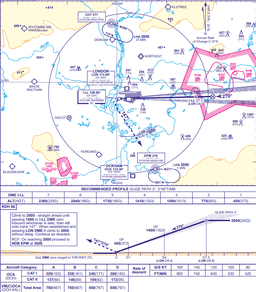
You're flying the STAR into London and ATC assigns a hold at BIGGIN, 309 inbound, right turns (standard). You're currently heading 090.
Step 1: Inbound course is 309. You're heading 090.
Step 2: The outbound course is 129 (reciprocal of 309). Your heading of 090 is roughly 40 degrees from the outbound course.
Step 3: You're arriving from the non-holding side, within 70 degrees of the outbound course. Teardrop entry.
Step 4: Cross BIGGIN. Turn to a heading of approximately 099 (outbound course 129 minus 30 degrees, angling toward the holding side).
Step 5: Fly for one minute.
Step 6: Turn right to intercept the 309 inbound course. Fly to BIGGIN. You're in the hold.
Common Mistakes
Not identifying the inbound course. ATC might give you a radial (outbound from a VOR) and you need the reciprocal for the inbound course. The hold is flown inbound, not outbound.
Spending too long figuring out the entry. You have about 30 seconds. If you're not sure, pick the closest entry type and fly it. An imperfect entry flown confidently beats a perfect entry planned too late.
Forgetting to adjust timing. Your first circuit will probably have the wrong leg length. That's fine. Adjust on the second circuit. Most holds only require two or three circuits.
Not correcting for wind. If there's any crosswind, you'll drift out of the protected airspace unless you correct. Triple the inbound correction on the outbound leg.
Over-relying on the FMC. The FMC is great when it works. But if ATC gives you a hold that's not in your flight plan, you need to be able to fly it by hand. Practice this.
The Bigger Picture
Holding patterns aren't just about going in circles waiting for ATC. They teach you to think spatially about courses, headings, and wind — skills that make every instrument approach better. A pilot who can visualise a hold entry can also visualise an approach intercept, a procedure turn, or a circling manoeuvre.
And honestly, there's something satisfying about ATC throwing a hold at you and handling it smoothly. No hesitation, no fumbling with the FMC, just a clean entry and a steady racetrack while you wait your turn.
Holding patterns are one of those areas where hands-on practice accelerates learning dramatically. Drill entry decisions in our free browser Holding Pattern Trainer — working the entries yourself makes the concepts stick far faster than reading about them.