If you fly Microsoft Flight Simulator 2024 on PlayStation 5, one question comes up more than any other: what hardware can I actually plug in? The PC crowd has hundreds of yokes, throttles and pedals to choose from. On PS5 the list has been short, confusing, and — until recently — almost non-existent. The good news is that mid-2026 is the moment it finally opens up.
This guide is the honest, current picture as of July 2026. What works on PS5 today, what is arriving in the next few months, what absolutely does not work no matter what a forum post tells you, and how to decide whether to buy now or wait. Every product name, price and date here has been checked against multiple sources.
If you are brand new to the sim on console, start with our PS5 beginner guide first and come back here when you are ready to spend money on hardware.
Affiliate disclosure: This guide contains affiliate links. If you purchase through these links, SimTuts earns a small commission at no extra cost to you. We only recommend products we genuinely believe improve the flight sim experience.
Which flight sticks and yokes actually work on PS5 right now?
As of July 2026, three Thrustmaster devices are the realistic options on PS5: the T.Flight HOTAS 4, the newer T.Flight HOTAS 5 Microsoft Flight Simulator Edition, and — arriving in Q3 2026 — the TCA Sky Yoke, which will be the first yoke you can use on a PlayStation at all. Everything else in the flight-sim hardware world is PC-only.
That is the whole picture. It is a Thrustmaster world on PS5 because Thrustmaster has done the work to get devices officially licensed for PlayStation. Other manufacturers have not, yet.
When MSFS 2024 launched on PS5 on 8 December 2025, the situation was even narrower: the Thrustmaster T.Flight HOTAS 4 was the only flight stick compatible with the sim on PS5, full stop. It is an entry-level PlayStation-licensed joystick-and-throttle combo, priced around $99.99, with 12 buttons, a trigger and a twist-grip rudder. It works plug-and-play — the sim recognises it without you configuring anything.
Series lead Jorg Neumann said at the time that "there's quite a few controllers now in development for PlayStation," and that the PlayStation peripheral ecosystem would grow the way Xbox's did. Mid-2026 is that growth arriving.
What is the Thrustmaster T.Flight HOTAS 5 MSFS Edition?
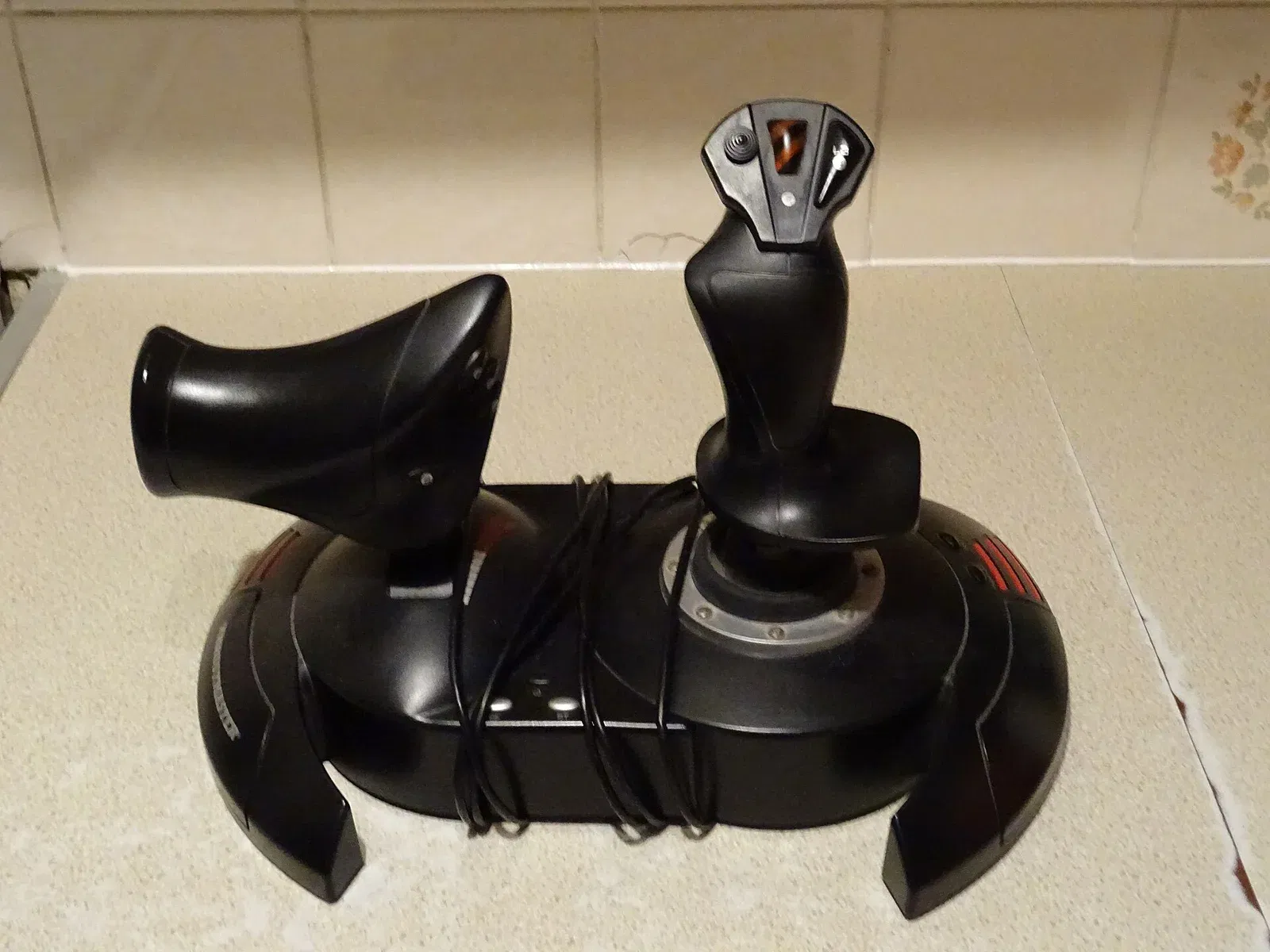
The T.Flight HOTAS 5 Microsoft Flight Simulator Edition is a refreshed, higher-precision version of the HOTAS 4, released on 12 June 2026 at a suggested price of $109.99 (€99.99 / £89.99). It works on PS5, PS4 and PC, and it is recognised plug-and-play by MSFS 2024 with no setup needed.
It is best understood as an evolution rather than a revolution. The core layout — a joystick with a detachable throttle — is inherited from the HOTAS 4. What changed matters, though:
- 16-bit precision on the main axes, a big jump from the 10-bit resolution of the HOTAS 4. In practice that means smoother, finer control inputs, which you feel most on gentle approach corrections.
- A few more buttons than the HOTAS 4, plus a hat switch and trigger, giving you more to bind for views, trim and autopilot.
- A twist-grip rudder built into the stick, so you get yaw control without separate pedals.
- A detachable throttle you can position where it suits your setup.
The quietly important feature is expandability. The HOTAS 5 (like the HOTAS 4) can act as an interface to connect a set of Thrustmaster TFRP rudder pedals to the PS5. There is no native way to plug rudder pedals straight into a PS5 for MSFS 2024 — the HOTAS is the bridge that makes pedals possible on console at all.
One clarification that trips people up: the HOTAS 5 comes in different versions for different platforms. The Microsoft Flight Simulator Edition covers PS5, PS4 and PC. It is not an Xbox device. If you buy an Xbox-branded Thrustmaster stick expecting it to work on your PS5, it will not.
What is the TCA Sky Yoke and is it really the first PS5 yoke?
Yes. The Thrustmaster TCA Sky Yoke, revealed at FlightSimExpo 2026 in Saint Paul, Minnesota on 12 June 2026, is Thrustmaster's first general-aviation yoke and the first yoke of any kind compatible with PlayStation 5. It is due in Q3 2026 at $199.99 (€199.99 / £169.99) and also works on Xbox Series X|S and PC.
Until now, if you wanted a yoke rather than a stick, PS5 simply was not an option. That is what makes the Sky Yoke a genuinely significant release for console pilots, especially anyone flying general-aviation aircraft like the Cessna 172 or a Boeing airliner where a yoke matches the real control column far better than a sidestick does.
On paper it is a properly featured device, not a toy:
- Hall-effect sensors on the main axes (contactless, so no wear-related drift over time)
- A steel pitch-axis shaft with 3.5 inches of pitch travel and 100 degrees of rotation
- 7 axes total, covering pitch, roll, a built-in throttle, a trim system and yaw control
- 24 action buttons, an 8-way point-of-view hat switch, a mini-stick and 2 analog triggers
- A trim wheel
- Native plug-and-play integration in MSFS 2024
There is even a shared-cockpit angle: the Sky Yoke supports connecting two yokes at once on PC, PS5 and Xbox, so a second person can fly the same aircraft from the right seat.
The honest caveat is that, at the time of writing, this is an announced product with a Q3 2026 window, not something shipping today. Announced release windows can slip. Treat the specs as confirmed and the exact ship date as "soon, but watch for it."
Get flight sim tips in your inbox
New guides, checklists, and tips — no spam. Unsubscribe any time.
What does NOT work on PS5?
Almost everything from the PC flight-sim world. Generic PC joysticks, Honeycomb yokes, Virpil and VKB sticks, Winwing gear, and any Xbox-only peripheral will not work on your PS5 for MSFS 2024. The PS5 only accepts peripherals that carry official PlayStation licensing, and right now that means Thrustmaster's T.Flight and TCA Sky Yoke line.
This is the single biggest source of wasted money and frustration in the PS5 flight-sim community. Someone sees a fantastic deal on a Honeycomb Alpha yoke or a high-end HOTAS and assumes "USB is USB." It is not. The console checks for licensing at the hardware level, and unlicensed devices are simply not seen.
A few specific traps:
- Xbox versions are not PS5 compatible. Manufacturers make separate PlayStation and Xbox SKUs precisely because a device licensed for one console does not work on the other. Always check the box says PS5 or "PlayStation licensed" before buying.
- PC-only brands stay PC-only. The excellent Honeycomb, Winwing, Virpil and MOZA hardware we cover in our airliner hardware guide is for PC. None of it is a PS5 option today. If you want that class of gear, you want a PC, not a workaround.
- No native rudder pedals. You cannot plug rudder pedals straight into the PS5. The only route is Thrustmaster TFRP pedals connected through a T.Flight HOTAS.
Do keyboard and mouse work on PS5?
Yes — a USB keyboard and mouse are officially supported on the PS5 version of MSFS 2024, and they make cockpit interaction far easier. The official hardware guidance lists USB mouse and keyboard as part of the enhanced pilot experience on PlayStation, which is genuinely useful for clicking switches, entering flight-plan data and navigating menus that are fiddly with a controller.
The catch is the connection type. PS5 is reliable with wired USB (and USB-dongle wireless) keyboards and mice; Bluetooth keyboards and mice are generally not supported by the console for this kind of input. If you already own a wireless keyboard with a little USB dongle, that will usually work. A pure-Bluetooth keyboard often will not. When in doubt, use a wired one.
A mouse in particular is worth having even if you also buy a stick or yoke. Flight controls handle flying the aircraft; a mouse handles the hundreds of cockpit switches and knobs that a stick's buttons cannot cover.
How do the PS5 options compare?
Here is the current PS5-compatible lineup side by side. Prices are manufacturer suggested retail and will vary by retailer and region.
| Device | Type | Price (USD / EUR / GBP) | PS5? | Rudder | Availability |
|---|---|---|---|---|---|
| DualSense controller | Gamepad | Included with console | Yes | Gyro / stick | Now |
| T.Flight HOTAS 4 | Stick + throttle | ~$99.99 | Yes | Twist grip | Now |
| T.Flight HOTAS 5 MSFS Edition | Stick + throttle | $109.99 / €99.99 / £89.99 | Yes | Twist grip | Now (released 12 Jun 2026) |
| Thrustmaster TFRP pedals | Rudder pedals | ~$129.99 | Via HOTAS only | Dedicated pedals | Now (needs a HOTAS) |
| TCA Sky Yoke | Yoke + throttle | $199.99 / €199.99 / £169.99 | Yes | Built-in yaw | Q3 2026 (announced) |
A note on reading this table: the HOTAS 4 and HOTAS 5 are close in price, so unless you find the HOTAS 4 heavily discounted, the HOTAS 5's 16-bit precision and extra buttons make it the better buy of the two. The Sky Yoke sits in a different category — it is a yoke, not a stick, and it costs roughly double.
Photo: D Eaketts, CC BY-SA 4.0, via Wikimedia Commons
Should you buy a HOTAS now or wait for the TCA Sky Yoke?
It depends on what you fly and how patient you are. If you mostly fly general aviation or airliners and you want the most realistic control, the yoke is worth waiting for. If you fly a mix, want yaw and throttle in one unit today, or lean toward fast jets and aerobatics, a HOTAS now makes more sense than waiting.
Here is how to decide honestly.
Buy the HOTAS 5 now if:
- You want to be flying with real hardware this week, not in a few months.
- You fly a variety of aircraft, including anything where a stick feels natural (fighters, aerobatic planes, some GA).
- You value the detachable throttle and twist rudder in a single compact unit.
- Budget matters — at ~$110 it is roughly half the price of the yoke.
Wait for the TCA Sky Yoke if:
- You primarily fly aircraft with a real yoke: most Cessnas, Pipers, Beechcraft, and Boeing airliners.
- Control realism is your priority and you are happy to wait for a Q3 2026 release.
- You want the trim wheel and larger button count for airliner workflows.
- You are okay with the risk that an announced date can move.
There is also a middle path: buy the HOTAS 5 now, fly with it for a few months, and reassess when the Sky Yoke actually ships and reviews land. A HOTAS is not a wasted purchase even if you later add a yoke — it stays useful for jets, and having both a stick and a yoke is exactly what many PC pilots end up doing anyway.
One more consideration for airliner fans: if your long-term goal is serious Airbus or Boeing flying with full throttle quadrants and study-level detail, understand that the deepest hardware ecosystem lives on PC, not PS5. Our best hardware for airliner operations guide shows what that looks like — but treat it as aspirational for console, not a shopping list you can act on today.
How do you set up and bind a flight stick on PS5?
Setup is genuinely simple because these devices are plug-and-play. Connect the stick to a USB port on the PS5 before launching the sim, start MSFS 2024, and the device is recognised with a working default profile automatically. From there you only tweak what you want to change.
Step by step:
- Plug in first. Connect the HOTAS (or Sky Yoke) to a USB port on the PS5 before you launch MSFS 2024. Connecting after the sim is running sometimes means it is not detected until a restart.
- Launch and load a flight. Start MSFS 2024 and open a Free Flight in a forgiving aircraft — the Cessna 172 is ideal for testing.
- Open Controls. Go to Options, then Controls. Your connected device should appear in the peripheral list.
- Confirm the default profile. Select the device and check that the plug-and-play default profile has loaded. For most people this is all you need — pitch, roll, rudder and throttle are already mapped sensibly.
- Test on the ground. Before you fly, move each axis and watch the control surfaces respond. Push the throttle and confirm engine response. Twist the grip (or use the yoke's yaw) and watch the rudder move.
- Adjust to taste. If an axis feels too twitchy or too sluggish, adjust its sensitivity and deadzone in the same Controls menu. Rebind any buttons you want for views, flaps, gear or autopilot.
If your bindings behave strangely — a reversed axis, a control that does nothing, or a stick that seems to fight you — our HOTAS bindings troubleshooting guide walks through the common fixes. Most binding problems are a wrong axis assignment or an inverted sensitivity setting, both quick to correct.
How do you add rudder pedals on PS5?
Connect Thrustmaster TFRP rudder pedals to the HOTAS itself, not directly to the PS5. The pedals plug into a port on the T.Flight HOTAS, and the HOTAS relays them to the console — this is the only supported way to get rudder pedals working on PS5 for MSFS 2024.
Once connected, go back into Options then Controls and confirm the pedals show up as a rudder axis (and toe-brake axes, if you want differential braking). Test them while taxiing: gentle rudder input should steer the nosewheel, and pressing the toe ends of each pedal should brake that side. If you fly crosswind approaches or want realistic ground handling, dedicated pedals are a meaningful upgrade over a twist grip.
Is a flight stick worth it over the DualSense on PS5?
For most people who fly regularly, yes. The DualSense is genuinely capable and a fine place to start, but a dedicated stick or yoke gives you longer throw, finer control, a real throttle you can set and leave, and far more buttons to bind. The difference is most obvious on precise tasks like holding a glideslope or making small trim corrections.
That said, do not feel you must buy hardware to enjoy the sim. Plenty of PS5 pilots fly happily on the DualSense for months, using its adaptive triggers for throttle feel and its gyro for fine roll inputs. The controller is a legitimate long-term option, not just a placeholder.
Think of it as a progression. Start on the DualSense to learn the fundamentals. Add a HOTAS when you want real throttle and stick feel. Consider the yoke when it ships if your flying leans toward GA and airliners. Add pedals when crosswind landings and ground handling start to matter to you. There is no need to buy everything at once, and buying in that order means each purchase solves a problem you have actually felt.
If you are heading toward VR as well, the PSVR2 setup guide covers how hardware and the headset work together — the Sense controllers change how you interact with the cockpit, which affects how much you lean on physical buttons.
The bottom line for PS5 pilots in 2026
The PS5 flight-sim hardware situation went from "one entry-level stick" at the December 2025 launch to a real, if still small, lineup by mid-2026. Today you can buy the T.Flight HOTAS 5 MSFS Edition and fly with proper stick-and-throttle controls, add TFRP pedals through it, and — from Q3 2026 — buy the first-ever PS5-compatible yoke in the TCA Sky Yoke.
The rules to remember are simple. Only officially PlayStation-licensed Thrustmaster hardware works. Xbox and PC peripherals do not. Rudder pedals only work through a HOTAS. USB keyboard and mouse are supported and worth having for cockpit clicks. And if your ambitions are study-level airliner flying with a full desk of hardware, that world still lives on PC.
Buy the HOTAS 5 if you want to fly with real controls now. Wait for the Sky Yoke if you fly yoke-based aircraft and can be patient. Either way, the days of PS5 pilots being stuck with a single option are over.