You can fly an airliner with a keyboard and mouse. People do it. But the moment you try to hold a localiser in a crosswind, or manage thrust during a rejected takeoff, you'll understand why hardware matters. Airliner operations in MSFS 2024 are about precision and workload management — and that's exactly what good peripherals give you.
This guide covers the hardware that actually makes a difference for airliner operations specifically. Not combat, not bush flying, not helicopters. Each of those has different priorities. If you're spending most of your time in a 737 or A320 cockpit, this is what to buy.
Affiliate disclosure: This guide contains affiliate links. If you purchase through these links, SimTuts earns a small commission at no extra cost to you. We only recommend products we genuinely believe improve the flight sim experience.
Sidestick vs Yoke: Which Do You Need?
This depends entirely on what you fly. It's not about preference — it's about matching your hardware to your aircraft.
Sidestick if you mainly fly Airbus (A320, A330, A380). Real Airbus aircraft use sidestick controllers mounted to the left of the captain and right of the first officer. A sidestick feels natural in these cockpits and the throw range matches the fly-by-wire inputs.
Yoke if you mainly fly Boeing (737, 747, 777, 787). Boeing uses conventional control columns. The yoke gives you push/pull for pitch and rotation for roll, which maps directly to the real aircraft's control feel.
If you fly both, start with whichever aircraft you spend more time in. You can always add the other later. Many sim pilots end up with both eventually.
Best Sidesticks for Airliner Operations
Budget: Thrustmaster T16000M FCS
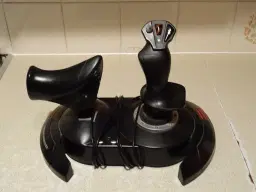
The Thrustmaster T16000M FCS uses Hall-effect sensors instead of potentiometers, which means no deadzone creep over time. For the price, the precision is remarkable. It's ambidextrous too — you can mount it on either side to match captain or first officer position.
The main compromise is the base. It's light and plasticky, which means it can slide around during precise inputs. A desk clamp or velcro helps. The button layout is functional but not Airbus-specific — you won't get a realistic detent or trigger feel.
Best for: Getting started with Airbus flying without spending much. Perfectly adequate for learning procedures and flying approaches.
Mid-Range: Thrustmaster TCA Sidestick Airbus Edition
The Thrustmaster TCA Sidestick Airbus Edition is designed specifically for Airbus flying. The grip shape replicates the real A320 sidestick, the button layout matches the actual aircraft, and there's a built-in hand rest that keeps your wrist at the right angle.
Internally it uses contactless magnetic sensors for smooth, accurate input. The tension is well-calibrated for fly-by-wire — light enough for normal manoeuvring but with enough resistance to hold position during turbulence corrections. The weighted base stays put on a desk.
Best for: Dedicated Airbus pilots who want the right feel without spending premium money. This is the sweet spot for most simmers.
Premium: Thrustmaster TCA Officer Pack Airbus Edition
The Thrustmaster TCA Officer Pack bundles the TCA Sidestick with the TCA Quadrant (throttle) in one package. You get the sidestick described above plus a dual-lever throttle quadrant with detents for idle, climb, flex/MCT, and TOGA — exactly matching the real Airbus thrust positions.
The throttle quadrant also carries two toggle switches, a rotary encoder, and several mappable buttons. Just be aware the engine master switches and the engine-mode selector with its CRANK/IGN-START positions aren't on this unit — those live on the separate TCA Quadrant Add-On, which isn't part of the Officer Pack. Even so, it's one of the most complete Airbus desktop solutions available.
Best for: Airbus pilots who want sidestick and throttle in one purchase. The bundle pricing saves roughly 15-20% versus buying separately.
Endgame: Win Wing Orion2 F18 Sidestick
The Win Wing Orion2 F18 is in a different league. CNC-machined metal construction, adjustable force curves via software, and a grip that feels like it belongs in a real cockpit. It's not Airbus-specific — it's modelled on the F/A-18 — but many Airbus simmers use it for the superior precision and build quality.
The caveat: Win Wing's customer service has a mixed reputation in the community. Shipping from China can be slow, and support responses aren't always timely. The hardware itself is excellent, but factor in the risk if something goes wrong.
Best for: Simmers who want the absolute best stick and are comfortable buying direct from a specialist manufacturer.
Endgame: MOZA AB6 Force Feedback Base + MHG Flightstick
The MOZA AB6 bundle is the force-feedback option in this list. The base uses dual servo motors to deliver 6 N·m of sustained torque, which means the stick actually pushes back — you feel control loading change with airspeed, trim forces, and buffet instead of the same spring resistance everywhere. Once you've flown an approach feeling the aircraft through the stick, it's hard to go back.
The included MHG grip is fighter-inspired rather than Airbus-style, with 4 buttons, four multi-way switches, and a Hall-effect hat — more than enough for autopilot, trim, and camera bindings. MOZA lists support for MSFS 2020/2024, X-Plane 10-12, and DCS, and the bundle ships with a table clamp; a hard-mount plate is optional.
Best for: Simmers who value control feel above all else. Force feedback is the single biggest realism upgrade a stick can offer, and this is one of the most accessible ways to get it.
Best Yokes for Airliner Operations
Mid-Range / Premium: Honeycomb Alpha Flight Controls
The Honeycomb Alpha Flight Controls transformed the yoke market when it launched. Metal shaft, smooth bearings, realistic throw range, and a switch panel with toggle switches for battery, alternator, avionics, and lights. The build quality embarrassed products costing twice as much.
For airliner operations, the Alpha gives you proper push/pull pitch control and natural rotation for roll. The switches don't map perfectly to a 737 overhead panel, but they're useful for quick access to common functions. The desk clamp is solid and the yoke stays exactly where you put it.
If you're on Xbox as well as PC, the Honeycomb Alpha XPC is the cross-platform version with identical quality.
Best for: Any Boeing airliner pilot. There's nothing in this price range that comes close. Many real-world pilots use the Alpha for their home simulators.
Endgame: Win Wing CyberTaurus Yoke
The Win Wing CyberTaurus is designed specifically for Boeing airliner simulation. It's a 1:1-scale replica of a 737 control wheel — a 35cm wheel on a die-cast aluminium chassis — built from real full-flight-simulator data. What sets it apart is force feedback: it drives up to 575N on the pitch axis and 60Nm on roll, simulating the control-loading forces that build with speed and configuration rather than a simple spring. The throw range and resistance match what real Boeing pilots describe.
If you're serious about Boeing specifically, this is about the closest you'll get without building a full cockpit. There's a non-force-feedback variant too if you want the shape and feel without the loading motors.
Same customer service caveat as the sidestick — Win Wing (now trading as WinCTRL) makes outstanding hardware, but after-sales support can be slow and stock ships from China. Buy knowing that.
Best for: Dedicated Boeing pilots who want no compromises. The build quality and authentic feel justify the price for many users.
Best Throttle Quadrants
Budget: Thrustmaster TCA Quadrant Airbus Edition
The Thrustmaster TCA Quadrant Airbus Edition gives you dual thrust levers with Airbus-specific detents at idle, climb, flex/MCT, and TOGA positions. You physically feel each thrust gate as you push through, which is essential for learning proper Airbus power management.
The levers move smoothly and the detents are firm enough to hold position but not so stiff that you can't push through quickly for a go-around. For the price, it's an excellent introduction to proper throttle management.
Best for: Airbus pilots on a budget. Pairs perfectly with the TCA Sidestick.
Premium: Honeycomb Bravo Throttle Quadrant
The Honeycomb Bravo Throttle Quadrant is the Swiss Army knife of throttle quadrants. It comes with interchangeable handles — commercial levers and GA levers with prop/mixture handles. Swap them depending on what you're flying. An Airbus-specific throttle pack is available separately.
Beyond the throttle levers, it includes a trim wheel, flap lever, landing gear switch, and an annunciator panel with LED indicators for autopilot, gear status, and warnings. The trim wheel alone is worth it — rolling trim during a manual approach is one of those things that's nearly impossible to do well on a keyboard.
Best for: Pilots who fly multiple aircraft types. The interchangeable handles and built-in annunciator panel mean you never need another throttle quadrant.
Endgame: Win Wing URSA Minor 32 Throttle
The Win Wing URSA Minor 32 Throttle Metal is a full-metal replica of the Airbus A320 throttle: two thrust levers with authentic detents and a reverse latching lever that stops reverse thrust engaging between idle and TO/GA, just like the real jet. The backlighting syncs with your sim.
Add the companion 32 PAC Metal module and you get the rest of the A320 centre console — flaps lever, speed brake, parking brake, and rudder trim — in the correct positions. Disable the detents and the levers run continuous, so it handles turboprops and widebodies too. The level of metal-built detail is unmatched by anything from Thrustmaster or Honeycomb.
Best for: Pilots who want the most realistic Airbus throttle experience for a desktop setup. It's keenly priced for what it is, and nothing else comes as close to the real aircraft feel.
Get flight sim tips in your inbox
New guides, checklists, and tips. No spam. Unsubscribe any time.
Best Rudder Pedals
Rudder pedals might seem optional for airliner operations. They're not. Crosswind landings, engine-out procedures, and ground steering all require coordinated rudder input. Twist-grip rudder on a joystick works for casual flying, but for realistic airliner operations you need proper pedals.
Budget: Thrustmaster TFRP Rudder Pedals
The Thrustmaster TFRP uses a sliding rail design rather than traditional pivoting pedals. Your feet push forward and backward on rails. It's a different feel, but the precision is good and the differential braking (press toe end of each pedal independently) works well for ground steering.
The rails are smooth and the spring centering returns to neutral consistently. The main limitation is the light weight — on hard floors they can slide, so a carpet or anti-slip mat helps.
Best for: Getting started with rudder control. Good enough for crosswind landings and basic ground ops.
Mid-Range: Logitech G Pro Flight Rudder Pedals
The Logitech G Pro Flight Rudder Pedals use a traditional pivoting design — press left pedal forward, right pedal comes back, and vice versa. This matches how real aircraft rudder pedals feel. Differential toe brakes sit at the top of each pedal.
The tension adjustment lets you dial in the resistance you want. Heavier tension gives more control during fine adjustments on approach; lighter tension works better for ground steering. The self-centering mechanism is reliable and the pedals are heavy enough to stay put.
Best for: Pilots who want a realistic pedal feel without paying premium prices. The traditional pivot mechanism feels more natural than rail designs.
Premium: Thrustmaster TPR Pendular Rudder Pedals
The Thrustmaster TPR uses a pendular mechanism that replicates how real aircraft rudder systems work. The pedals hang from a central pivot point, creating a natural arc of motion. The industrial metal construction is immediately obvious — these are built like professional equipment.
The PENDUL_R pendular mechanism with H.E.A.R.T. Hall effect sensors on the toe brakes provides progressive resistance. Light pressure for gentle braking, firm pressure for maximum deceleration. The differential control is precise enough for single-engine taxiing.
Best for: Pilots who want the closest thing to real rudder pedals at a desk. The pendular mechanism genuinely feels different from cheaper alternatives.
Head Tracking
Head tracking transforms airliner operations more than any other single upgrade. Being able to glance at the overhead panel, check the engine instruments, or look out the side window during a turn — just by moving your head — removes the need for hat switches and view bindings entirely.
Free: Webcam + OpenTrack
If you already have a decent webcam — even a basic Logitech C920 or C922 — you can get head tracking for free. OpenTrack includes a face-tracking module called NeuralNet Tracker that uses your webcam to track your head position. No extra hardware needed.
The tracking is surprisingly usable for airliner simulation. It's less precise than IR-based solutions and can struggle in low light, but for instrument scan and overhead panel glances it works. If you already own a webcam, try this before buying anything else.
Best for: Trying head tracking right now with zero spend. If your webcam is already on your monitor, you can be flying with head tracking in 10 minutes.
Budget: SmoothTrack (Phone App)
SmoothTrack uses your phone's face-tracking camera as a head tracker. Mount your phone above your monitor, install the app (~£10), and pair it with OpenTrack on your PC. That's it — full head tracking for the cost of a takeaway.
The tracking is better than a webcam because modern phones have excellent face-tracking hardware. You do lose your phone while flying, but for trying proper head tracking before committing to TrackIR or Tobii, it's a no-brainer. Many simmers started here and upgraded later.
Best for: Slightly better than webcam tracking for minimal cost. Good stepping stone before dedicated hardware.
Budget: Delan Clip + OpenTrack
The Delan Clip is a small IR LED clip that attaches to your headset and works with a PS3 Eye camera (or similar IR camera) and the free OpenTrack software. It's essentially the same technology as TrackIR at a fraction of the price.
The tracking quality is surprisingly close to TrackIR for most users. The main trade-off is setup time — you'll need to configure OpenTrack's curves and filtering yourself, whereas TrackIR works out of the box. The Delan Clip community has plenty of pre-made profiles to help.
Best for: Simmers who want proper IR head tracking without the TrackIR price tag. A popular choice in the DCS and airliner communities.
Mid-Range: TrackIR 5
TrackIR 5 uses an infrared camera mounted on your monitor and a reflective clip on your headset. It tracks your head position in six degrees of freedom — X, Y, Z, pitch, yaw, and roll. The response curves are fully configurable, so you can set how much real head movement translates to in-sim view movement.
For airliner operations, you'll typically set the curves with a small deadzone for straight ahead (so minor head movements don't shift your view during instrument scan) and progressive acceleration for larger movements. Looking over at the FMC or up at the overhead panel becomes instinctive after a few flights.
Best for: Most simmers. TrackIR has been the standard for years. It works reliably, the software is mature, and almost every flight sim supports it natively.
Premium: Tobii Eye Tracker 5
The Tobii Eye Tracker 5 combines eye tracking with head tracking. The sensor bar mounts below your monitor and tracks both where your head is pointing and where your eyes are looking. This creates a more natural view system — you can glance at instruments with just your eyes rather than turning your head.
The distinction matters in an airliner cockpit. During an approach, your head stays mostly forward while your eyes scan between the PFD, ND, and the runway. Tobii captures this naturally. The setup is also simpler — no headset clip, no calibration routine, just sit down and fly.
Best for: Pilots who want the most natural view experience. Particularly good for airliner operations where the instrument scan is constant.
VR Headsets
VR is the ultimate head tracking — instead of moving a view on a flat screen, you're sitting inside the cockpit. Looking left and you see the side window. Glancing up and the overhead panel is right there. The sense of scale in a 747 cockpit or the depth perception on approach is something no monitor can replicate.
The trade-off for airliner operations specifically is readability. You need to read FMC screens, approach plates, and small cockpit labels. Cheaper headsets can make this frustrating. Higher resolution headsets have largely solved this, but it's worth knowing the limitation.
Mid-Range: Meta Quest 3S
The Meta Quest 3S is the most accessible entry into VR flight simming. It works wirelessly via Air Link or with a USB-C cable, which means no dedicated base stations or external sensors. The resolution is good enough for most cockpit instruments, and the passthrough cameras let you find your keyboard and throttle without removing the headset.
For MSFS 2024, the Quest 3S runs via SteamVR or the native Meta Link. Performance depends heavily on your PC — you'll want a strong GPU (RTX 3070 or better) to maintain smooth frame rates in airliner cockpits with all those glass displays rendering.
Best for: Trying VR without a massive investment. The wireless option is genuinely freeing — no cable tugging when you check your six.
Premium: Pimax Crystal Light
The Pimax Crystal Light is built for sim pilots. The wide field of view (claimed 115° horizontal, independent tests measure ~103-104°) and high resolution (35 PPD) mean you can actually read FMC screens and approach plate text without squinting. This is the headset that makes VR practical for long-haul airliner operations rather than just a novelty.
The wider FOV also matters for situational awareness — you see more of the cockpit in your peripheral vision, which makes instrument scan feel more natural. The trade-off is weight and price. It's heavier than a Quest and considerably more expensive.
Best for: Dedicated VR simmers who want to use VR as their primary display. If you're going to fly entire routes in VR, the readability makes or breaks the experience.
A Note on VR vs Head Tracking
For airliner simulation, many experienced simmers prefer head tracking over VR. The reasons: you can easily read charts on a second monitor, use a Stream Deck, and see your physical throttle and yoke. VR is more immersive but more isolated. If you're unsure, try head tracking first — it's cheaper and you can always add VR later.
Button Boxes and Stream Deck
Airliner cockpits have hundreds of switches, knobs, and buttons. A button box or programmable keypad lets you map critical functions to physical controls instead of hunting through menus with a mouse.
Mid-Range: Elgato Stream Deck MK.2
The Elgato Stream Deck MK.2 has 15 LCD keys that display custom icons — so each button shows exactly what it does. Map it to autopilot functions, autobrake settings, lighting controls, or MCDU pages. Community profiles for MSFS 2024 are widely available, including aircraft-specific layouts for the PMDG 737 and Fenix A320.
The real value is reducing mouse clicks. Instead of clicking the MCP to change altitude, heading, or speed, you press a physical button. During high-workload phases like approach, this keeps your eyes on the instruments instead of hunting for tiny cockpit buttons.
Best for: Any airliner pilot who wants faster access to cockpit controls. The visual feedback on each key eliminates the memorisation problem of traditional button boxes.
MCDU Panels
If you fly the Airbus, the MCDU is where you spend your pre-flight — and programming it with a mouse is the least immersive part of any session. A hardware MCDU panel turns that into the real head-down flow: type on physical keys, read the real page layout on a built-in screen.
Premium: MOZA MA3F Flight Computer Display
The MOZA MA3F Flight Computer Display is a standalone A320-style MCDU with a 5.1-inch IPS screen, a die-cast aluminium front panel, and backlit keys with proper tactile feedback. It syncs with the sim in real time through MOZA's Cockpit software, so the display shows your actual FMS pages — INIT, F-PLN, PERF — and every entry you make on the keypad goes straight into the aircraft. It also has built-in checklist and whiteboard utilities for jotting clearances, and sits on a desktop stand or a 75mm VESA mount.
MOZA lists support for the leading simulators and popular Airbus add-ons; check their compatibility list for your specific aircraft before ordering.
Best for: Airbus pilots who already have stick and throttle sorted and want the pre-flight flow to feel real. Pairs naturally with the procedures in our A320 MCDU guides — everything you practise in our free MCDU trainer maps key-for-key onto the physical unit.
What to Buy First
If you're starting from scratch, here's the priority order for airliner operations:
- Sidestick or yoke — You need one of these. Pick based on your primary aircraft.
- Throttle quadrant — Proper thrust management is central to airliner operations. Detents matter.
- Rudder pedals — Essential for crosswind landings and ground steering. A twist grip works temporarily.
- Head tracking — Transforms the experience more than you expect. Makes instrument scan natural.
- Button box / Stream Deck — Nice to have. Reduces mouse dependency during high-workload phases.
Don't buy everything at once. Start with a stick or yoke and throttle, fly for a few weeks, and add peripherals as you identify what's limiting you.
Complete Build Suggestions
Budget Build (~£150-200)
- Thrustmaster TCA Sidestick Airbus Edition — proper Airbus grip and feel
- Thrustmaster TCA Quadrant Airbus Edition — Airbus detents at idle/climb/TOGA
- Thrustmaster TFRP Rudder Pedals — basic but functional
This covers all three axes and gives you Airbus-specific detents and grip shape. Perfectly adequate for learning procedures, flying online, and enjoying airliner routes.
Mid-Range Build (~£350-500)
- Honeycomb Alpha — premium yoke for Boeing flying
- Honeycomb Bravo — configurable throttle with trim wheel and gear lever
- Logitech G Pro Flight Rudder Pedals — traditional pivot with toe brakes
- TrackIR 5 — head tracking for natural instrument scan
The Honeycomb duo is the most popular combination in the airliner sim community for good reason. Add TrackIR and you've got a setup that feels genuinely immersive.
Premium Build (~£800-1000+)
- Honeycomb Alpha + TCA Sidestick — yoke for Boeing, sidestick for Airbus
- Honeycomb Bravo — universal throttle quadrant
- Thrustmaster TPR Rudder Pedals — pendular mechanism, built like real equipment
- Tobii Eye Tracker 5 — eye + head tracking
- Elgato Stream Deck MK.2 — programmable LCD buttons for cockpit controls
At this level, the hardware stops being a limitation entirely. Every control input feels deliberate and precise. The combination of eye tracking and a Stream Deck means you rarely touch the mouse during a flight.
Endgame Build (~£1500+)
- Win Wing CyberTaurus + Orion2 F18 Sidestick — force-feedback Boeing yoke, precision stick for Airbus
- Win Wing URSA Minor 32 Throttle — replica A320 throttle quadrant
- Thrustmaster TPR Rudder Pedals — pendular mechanism
- Tobii Eye Tracker 5 — eye + head tracking
- Elgato Stream Deck MK.2 — programmable cockpit controls
This is as close as you get to a real cockpit without building a full sim pit. The Win Wing CyberTaurus yoke and the URSA Minor 32 throttle are genuinely startling the first time you use them. Just be aware that Win Wing ships from China and customer support can be slow — the hardware is excellent, but plan for longer delivery times.
The most important thing is to start flying. Any hardware is better than keyboard and mouse for airliner operations, and you can upgrade incrementally as you figure out what matters most to you. The sim community is full of people who bought everything at once and realised they only needed half of it — and equally full of people who bought one good sidestick and flew happily for years.